
Behind the scene: the New Year video prompt
Build a clear New Year video prompt with identity, setting, timed action, camera movement and sound.
TL;DR: A useful New Year video prompt describes one adult subject, one setting and one simple action, then gives the new year a clear final reveal. The examples below use an eight-second structure. Timing is guidance for the model, not an exact edit list.
The prompt has five jobs
A photo alone does not explain the story. The prompt needs to say what to preserve and what to change:
- Identity: Use the uploaded photo as the adult subject’s identity and clothing reference.
- Setting: Describe one coherent location and its lighting.
- Action: Give the subject a movement that can happen naturally in eight seconds.
- Camera: Choose a simple tracking move, then a final hold.
- Sound: Ask for an original atmosphere or instrumental cue, rather than naming a copyrighted recording.
Avoid stacking conflicting instructions. A wide panorama, close-up portrait, fast spin and perfect number transformation in the same short shot leave the model too many things to reconcile.
Mountain sunrise: reveal the destination
Use this structure with the Goodbye 2026 Welcome 2027 effect:
Create an eight-second vertical cinematic scene. Preserve the adult subject’s identity and clothing from the reference photo. Begin on a rocky path beside large 2026 numerals. Follow the subject climbing toward a summit. Reveal giant 2027 numerals in warm sunrise light, then hold on the person at the summit. Use natural movement, a smooth camera, wind ambience and an original hopeful instrumental cue. No logos or subtitles.
- 0-2s: Establish identity, location and the old year.
- 2-4.5s: Give the climb one clear direction.
- 4.5-6.5s: Reveal the destination instead of cutting to an unrelated scene.
- 6.5-8s: Hold the new year so it can be read on a small screen.
The mountain gives the story a visible destination. Too many cuts can interrupt that connection and make identity drift more noticeable.
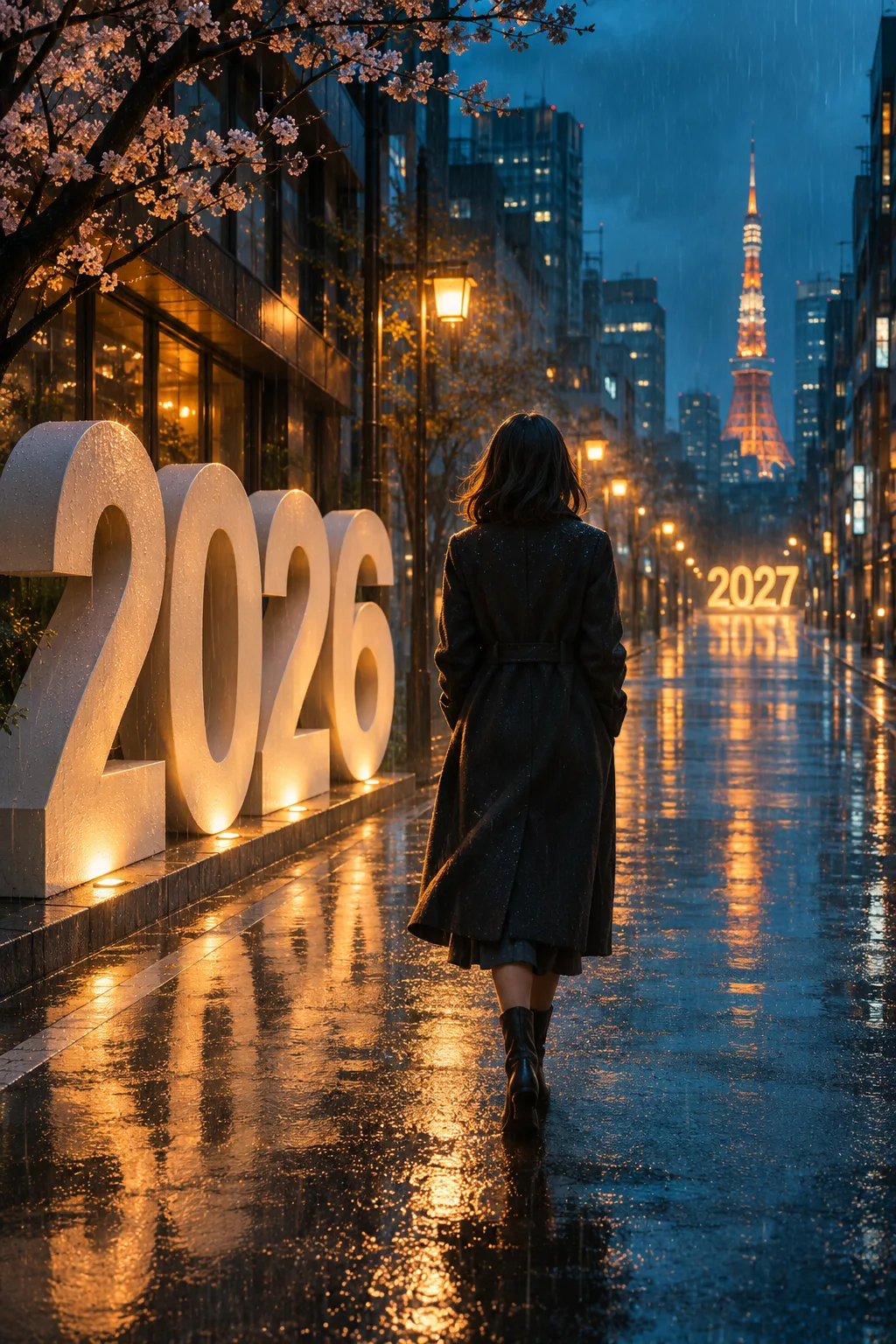
Rainy goodbye: let light carry the change
For the rainy goodbye scene, exchange the climb for a walk and the sunrise for reflected streetlight:
In an eight-second vertical shot, follow the adult person from the reference photo along a rainy city street at blue hour. Begin beside 2026 lettering. As the person walks away, leave the old numerals behind and reveal warm 2027 lights ahead. Wet pavement reflects the change from cool blue to amber. End with a gentle hold. Use rain ambience and an original quiet piano motif.
The same four beats apply: establish at 0-2s, walk at 2-4.5s, reveal at 4.5-6.5s and hold at 6.5-8s. Avoid adding a second subject, traffic chase or rapid camera orbit; the emotional shift should stay easy to read.
Push the 6: make the physical action explicit
Push the 6 needs a more specific interaction:
Show an adult person beside monumental 2026 numerals on an open plaza at sunrise. In the first two seconds, establish the person and numbers. From 2 to 4.5 seconds, the person places both hands on the final 6 and pushes it sideways. From 4.5 to 6.5 seconds, the 6 rolls aside and a 7 moves into its place. Hold on 2027 and the person’s celebration until eight seconds. Keep the movement simple and the objects solid, with believable weight.
This is the most demanding of the three scenes because the model must maintain hands, object contact and typography at once. A good prompt improves direction; it does not guarantee perfect physics or exact digits. Review the result before posting.
Photo and output settings matter too
Use one clear adult portrait. The generator uses the photo as a reference rather than demanding it remain the exact first frame. The site requests 9:16 video, eight seconds and your chosen 480p or 720p quality. That keeps the final composition suitable for mobile viewing.
We integrate Kie’s documented Seedance models. Their reference-image and first/last-frame modes are distinct. Technical details are available in the official Seedance Mini documentation. Model availability can change; the site does not promise a model name that the provider has not documented.
Price, music and expectations
A personalized video costs $9.90 per generation. There is no subscription and no extra charge for the listed 720p option. Confirmed failures return your video credits. A new successful attempt consumes a new credit, even if you prefer another variation.
Original generated audio may differ between attempts. If your post needs a particular trending song, add it using the platform’s licensed music library. The free collection is a separate set of ready-made images and illustrated clips.
Prompt questions
Do I need to copy these prompts into the generator?
No. Each effect already includes its scene prompt. These examples explain the creative structure.
Can the AI promise an exact face?
No. A sharp reference helps, but likeness, hands and expressions may vary.
Will the actions happen at exactly 4.5 seconds?
No. Half-second timing communicates sequence and emphasis, not frame-level control.
Can I use fictional characters?
Yes, for adult characters and artwork you have the right to use. Stylized results are less predictable.
Is the trending song included?
No particular commercial recording is included. The prompt asks for original generated sound.
Can I get a free personal AI video?
Personalized generation is paid. Cards, wallpapers and illustrated clips can be downloaded free, without an account.
Say goodbye to 2026 with your own video
Choose the mountain sunrise, rainy goodbye, or Push the 6. For the upload-to-download workflow, follow the four-step tutorial.